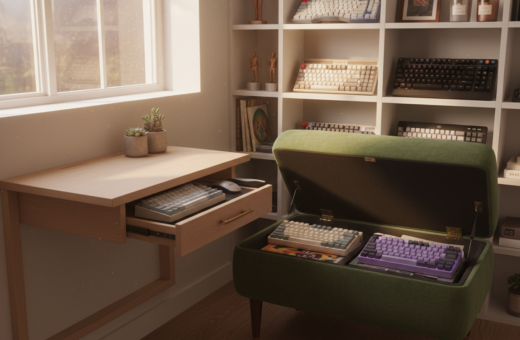
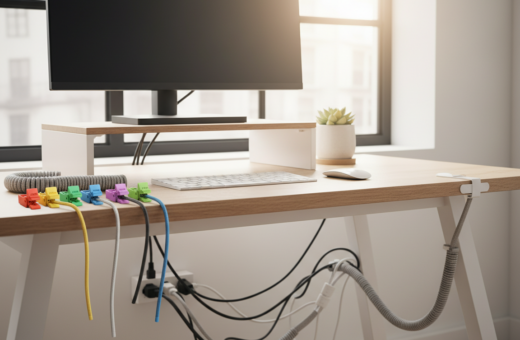
The author recalled how small shifts in layout and storage transformed a cluttered space into a calm, productive home office. Implementing easy clean desk organization ideas turned nightly upkeep into a short, predictable task.
They chose a few practical storage solutions and gave every item a designated place. The result was a tidy surface each evening and a faster workflow the next morning.
These simple changes boosted productivity and reduced maintenance time across the room. This guide outlines the tested strategies that kept the desk neat and made the home office more inviting.
The Psychological Impact of a Cluttered Workspace
Visual clutter in a work area often steals focus and stretches the time it takes to finish even simple tasks. Research published in the Journal of Neuroscience shows that competing visual cues reduce attention and increase the time needed for work.
Julie Dykema of The Container Store recommends clearing everything out to take inventory of what is truly essential. Removing nonessential items makes it easier to spot which office supplies and papers are needed daily.
Too many things on a surface raise stress levels. A chaotic room filled with extra supplies can trigger anxiety and disrupt routines at home and in the office.
Limiting the number of items—keeping a few pens, a notepad, and key tools—helps create a focused workspace. Effective storage and targeted storage solutions prevent accumulation and keep the space ready for work each morning.
“Start by emptying the area and only return items that support your daily tasks.”
- Clear nonessential objects to reduce distraction.
- Use simple storage to control office supplies and other items.
- Check the workspace weekly to limit clutter and save time.
Assessing Your Current Desk Needs
Begin by noting what you reach for every morning; that list will shape how the area functions.
They should empty drawers and sort items into three piles: daily, occasional, and archive. This honest evaluation shows which supplies deserve surface space and which belong in secondary storage.
Whitney Leigh Morris argues in Small Space Style that living well in a small home office depends on knowing what you truly need. Her point helps prioritization without sacrificing style.
Take time with drawer contents. Clearing a single drawer often reveals duplicates and items that never support real work. Once pared down, the workspace feels lighter and faster to prepare each morning.
Categorize storage so every piece of equipment has a home. Arrange drawers and shelves by frequency of use to save time and reduce distractions.
- Identify daily items and keep them within reach.
- Move occasional supplies to secondary storage.
- Label drawers so the workspace remains efficient.
“You do not need to live large to live beautifully.”
For a simple checklist and further guidance, visit this sample page before reassembling the desk area.
Easy Clean Desk Organization Ideas for Daily Efficiency
A few targeted tools and daily steps made setting up for work faster and less stressful.
Start with items that move the most. Trays and small bins corral loose paper and keep office supplies from migrating across the desktop. A simple routine—five minutes each evening—prevents piles from growing and saves time the next morning.
Essential Tools for Success
Poppin desk organizers are useful for dividing a drawer so paper clips, pens, and sticky notes each have a place. Drawer dividers make retrieval quick and reduce the urge to leave things on the desktop.
- Use a shallow tray for incoming paper to stop loose sheets.
- Add a small container for paper clips and other tiny supplies.
- Limit desktop items to a pen, a notepad, and one small lamp.
Sustainable Choices for Your Office
Choose recycled storage like the Bigso Stockholm line to reduce waste and keep the room tidy. Durable organizers last longer and cut replacement time.
“Designate a home for every item and return it nightly.”
Managing Cable Clutter with Simple Tools
A few targeted tools can transform cable chaos into an orderly system that stays hidden. Tidying cords reduces visual clutter and makes the workspace feel larger. Small changes keep daily setup fast and predictable.
Cable Clips and Sleeves
Install a wall mount power strip with four outlets and four USB ports to keep plugs off the desk and reduce floor tangles. Command cord clips work well to run the power strip cord along the inside edge of a desk or along the wall. This hides lengths of cord while keeping them accessible.
- Wall mount power strip with 4 regular outlets + 4 USB ports keeps cords off surfaces.
- Command cord clips route cables along the inside edge or the wall to stay out of sight.
- Velcro cable labels make it simple to identify which cord belongs to each device without tracing it back.
- Adhesive cable holders prevent chargers from slipping behind the desk so items remain ready to use.
- A cable management box hides a power strip and excess wires for a neater home office look.
“Labeling and routing cables saves time and keeps the workspace focused.”
Utilizing Vertical Space for Better Storage
Wall-mounted storage turned spare vertical space into practical shelving that freed the surface for work.
Maximizing height is one of the smartest ways to expand usable area without expanding the room. Mounting shelves moves books and reference materials off the desk and into sight but out of the way.
Stackable paper trays keep paper sorted and prevent piles from creeping across the workspace. Hanging file organizers attach to the wall and save drawer space for less-used items.
A pegboard acts as a flexible organizer for scissors, pens, and chargers. Hooks and small containers on the pegboard mean fewer things on the surface and faster setup each morning.
- Move photos and clocks to shelves to clear surface space.
- Use wall files for current paper and active projects.
- Combine shelves with stackable trays for layered storage.
“Vertical storage is often underestimated; it can drastically reduce desktop clutter.”
Implementing Drawer Dividers for Small Supplies
They discovered that dividing drawer space changed how the whole workspace functioned.
Allocating small compartments for items like paper clips and pens made retrieval fast and habitual. Using a mix of rigid dividers and modular tray organizers kept tiny things from migrating during use.
Drawer organizers also protected larger office supplies such as staplers and tape dispensers. When each item had a set place, mornings were less frantic and the home office felt more reliable.
A practical trick: adhere round cord Command clips to the bottom of a drawer to lock dividers in place. This prevented sections from shifting when drawers opened and closed, keeping storage stable over time.
- Compartmentalize small supplies so essentials are visible at a glance.
- Choose adjustable dividers to match drawer dimensions and changing needs.
- Combine trays for pens with narrow slots for paper clips and other tiny items.
“A dedicated spot for every supply cut the time spent searching and kept the workspace productive.”
Taming Paper Clutter with Effective Filing
Turning loose sheets into labeled files changed how the room supported real work. A deliberate filing habit shrank piles and made each task faster to start. This section shows how to sort, store, and purge so paper stops slowing the daily routine.
Actionable files
Actionable Files
Begin with a single inbox for new mail and forms. Place a labeled folder or a shallow box nearby for items that require follow-up.
Keep only current papers in that container. When a task finishes, move the paper to long-term storage or recycle it. Marie Kondo’s Shoji Bamboo Collator is useful here; it keeps active documents and notebooks neat and within reach on a desk.
Shredding Habits
Set a daily shred or recycle step at the end of the day. A small shred bin beside the file box removes expired documents before they become clutter.
Shredding unnecessary documents each evening saves time in the morning and protects sensitive information. Over weeks, this habit turns paper handling into a short, predictable task rather than a looming chore.
- Sort incoming paper into action, archive, and shredding piles.
- Use a dedicated box or folder for papers that need attention.
- Shred or recycle surplus documents each day to prevent buildup.
Digitizing Documents to Eliminate Physical Waste
Bringing a compact scanner to the table made paper handling fast and repeatable each night. A handheld scanner lets them convert receipts, medical records, and forms right at the desk. That move cut the stack of paper that once lived on the desktop.
Scanned files live on a computer or in cloud storage, so bulky storage and filing cabinets are no longer needed. Jeff and his partner keep scanned tax documents in a shared Google Drive folder. This method freed space in their home office and simplified retrieval.
Daily backups matter. They use Backblaze to back up laptop and computer files automatically. Routine backups protect scanned documents and make digital work more reliable.
- Use a compact handheld scanner to remove paper from the desk.
- Store scans on a computer or cloud to shrink physical storage needs.
- Back up files daily with a service like Backblaze to keep documents safe.
“A small scanner and a solid backup plan turned months of filing into a single searchable folder.”
Choosing Multi-Functional Desk Accessories
Selecting multi-use pieces helps a compact workspace do more with less. A lamp that doubles as a charging hub saves plugs and keeps chargers off the desktop. The FluidStance Illum is a strong example: it offers both task and ambient lighting so one accessory meets multiple needs.
Using shelves to hold books and decorative boxes keeps paper and other items off the surface. This approach clears visible clutter while adding personality to the room.
- Select a lamp that charges phones to reduce cords and extra adapters.
- Choose an organizer that stores pens and receipts but also looks like decor.
- Pair stackable trays with wall shelves to move paper into short-term storage.
Multi-functional accessories cut the number of things on the desk and make nightly tidying faster. In a small home office, every combo unit saves surface space and improves routines.
Optimizing Your Desk Layout for Productivity
A purposeful layout shortens the path between thought and action, turning a restless surface into a reliable work zone.
Place frequently used office supplies within arm’s reach so reaching and bending are minimal. This reduces interruptions and saves time during focused work sessions.
Position the desk lamp to illuminate the active task area without casting glare on the monitor. Proper lighting improves focus and reduces eye strain during long sessions.
Integrate movement: a FluidStance Level balance board encourages active standing and can be a simple way to add motion to the workflow. It fits neatly beneath the desk and supports short standing periods.
An ergonomic layout prioritizes the computer and essentials to support healthy posture. Keep storage for small items close, and remove unnecessary things so the workspace stays functional and calm.
“Keep what you use daily within reach; everything else belongs in storage.”
Incorporating Ergonomic Solutions into Your Setup
Proper ergonomics reduce strain and help sustain focus during long work days. Small adjustments to screen height and posture make the workspace more comfortable and productive.
Monitor Risers
Raising the monitor brings the webcam to eye level and encourages a neutral neck position. A Quartet glass monitor riser is a sturdy option that also creates usable storage underneath.
Elevating a screen reduces neck strain and lowers fatigue over long sessions. It also frees up surface space so small items can be tucked beneath the riser.
- Bring the computer display to eye level to protect posture.
- Use a Quartet glass monitor riser to store a laptop, chargers, and other small items.
- Choose adjustable stands when multiple users or screens are involved so each person can set the right height.
- Elevation creates extra storage and helps keep the area tidy for daily work.
“An ergonomic setup is a key component of a productive office; comfort supports sustained focus.”
Creating a Dedicated Charging Station
A dedicated hub that holds an Apple Watch, AirPods, an iPad, and up to three phones kept the most-used devices ready each morning.
Centralizing power reduces the urge to leave chargers scattered across the surface. A compact charging station serves as a single organizer that preserves desk space and consolidates cables.
Mounting a power strip on the wall or beneath the unit keeps cords off the visible work area. This approach frees surface space and makes daily prep faster.
- Holds multiple devices: watch, earbuds, tablet, and three phones simultaneously.
- Reduces cable clutter: route cords to a single point under the table or to a wall mount.
- Saves storage: a compact station replaces several chargers and small power bricks.
- Keeps essential items charged and ready for work each day.
“A single charging hub turns nightly power-up into a predictable habit.”
Maintaining a Minimalist Desktop Surface
A clear tabletop lets tasks begin without the friction of searching for supplies. They kept only essential items within arm’s reach and moved extras to hidden storage.
Fewer items on the desktop reduce visual clutter and make concentration easier. By storing pens, spare paper, and peripheral gear in drawers or on shelves, the surface stays ready for work.
Minimalism is a habit, not a one-time project. A nightly sweep removes unnecessary pieces and prevents accumulation the next day. This small routine kept the workspace predictable and focused.
- Keep only daily tools on the desk to speed startup.
- Place surplus supplies in labeled storage to avoid ad hoc piles.
- Adopt a five-minute clear-and-reset step each evening to preserve order.
Design matters: a deliberate, pared-down surface supports better thinking and higher-quality work in a home office or shared space.
Adding Personal Touches for a Cozy Environment
Small personal touches can turn a functional workspace into a warm, lived-in corner of the home.
Comfortable accents make long sessions feel less tiring and invite a calmer routine. A soft throw or a scented candle creates a short ritual that marks the end of the workday.
The Ember smart coffee mug is a practical addition. It keeps a beverage at the preferred temperature so a hot drink lasts through focused stretches at the desk.
Thoughtful items also lift mood. A small plant, a framed photo, or a favorite object makes the space feel personal without adding clutter. Choose one or two pieces to keep the surface open.
- Pick a warm-glow lamp for both task light and ambiance.
- Place compact storage near the work area to hide supplies when not in use.
- Limit personal accents so the surface stays functional and calming.
“A few well-chosen items make the office feel like a place one wants to be, not just a place to work.”
For more styling cues, see a gallery of curated 47 desk organisation ideas.
Establishing a Daily Tidy-Up Routine
A five-minute tidy at day’s end resets the space and clears mental bandwidth for tomorrow. They made this short habit nonnegotiable: clear loose paper, return pens, and stow office supplies before powering down.
Spend the time wisely. Use drawer dividers and small organizers so items like paper clips and documents slide back into drawers quickly. A shallow box or labeled tray on shelves keeps active files visible but off the desktop.
Centralize charging and cables near the computer to reduce nightly cord wrangling. Place a tray for essentials—wallet, keys, laptop—so nothing migrates across the surface overnight.
- Five minutes each evening prevents clutter from growing.
- Dividers and organizers speed the return of small things.
- A dedicated box or wall organizer holds current documents and pens.
“A short, repeatable routine kept the home office ready and supported focused work the next morning.”
Conclusion
Over time, modest adjustments to storage and routine cut the time it took to reset the work area each night. These changes made tidying predictable and less stressful.
Desk organization that emphasizes vertical storage and cable routing reclaimed valuable surface space and reduced visual distraction. Using wall shelves and labeled bins kept essentials within reach and everything else out of sight.
Daily habits—five-minute tidy-ups and digitizing papers—kept clutter from returning. Consistency turned one-off tasks into a repeatable routine that saved minutes every morning.
A well-maintained desk supports focus, lowers friction, and improves work efficiency. Start with a single small change today and watch those minutes add up into a calmer, more productive workspace.