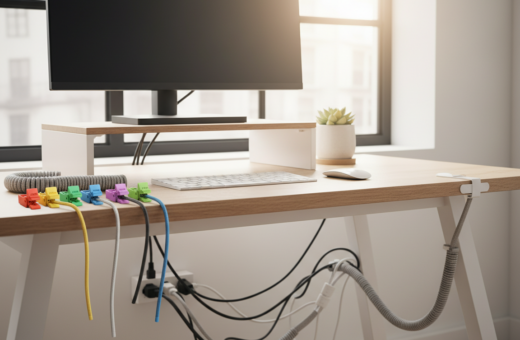
Updated March 2026. Tech reviewer Simon Hill found his home office looking like a warehouse due to the tangle of cables and cords trailing under desks. He realized that cluttered wiring hurts focus and slows work flow.
He recommends a clear first step: admit you do not need every single cord. Removing unused items frees space and makes true management possible.
Simple ties and a few storage boxes form the backbone of his approach. They let people group power leads and data cables, so each cord has a purpose.
These practical tips help transform a chaotic desk into a calm, functional workspace. With steady upkeep, the long-term payoff is better focus and a tidier home setup.
The First Step to Taming Your Tech Chaos
Start by pulling every cord and charger out of hiding and laying them on a clear surface. This makes the scale of the problem obvious and gives a real starting point for better management.
Assessing what to keep
Simon Hill advises gathering all cords, cables and power adapters into one central pile. He suggests checking each cord against the devices you still own.
Keep original boxes for phones and laptops when possible. Boxes help preserve resale value and keep chargers and extras together.
Purging broken items
Be ruthless: toss frayed cords and any cable for devices you no longer use. Before storing old devices, perform a factory reset to protect privacy.
- Use a labeled box or drawer for essential chargers and adapters.
- Evaluate your desk and table to see which chargers are necessary.
- If space is tight, consider versatile furniture like an Ikea Kallax unit to store devices and boxes.
Essential Cheap Cable Organization Ideas for Every Room
A handful of inexpensive supplies turns messy cords into a neat, reliable setup across the home and office. A pack of 60 ties for about $7 is a solid option to bundle cords on the floor and behind desks.
Simple tools deliver big results. A cable management box hides a tangled power strip and keeps living-room power under control. Cable sleeves gather multiple cables behind entertainment units so they don’t tangle.
- Install a cable tray under the desk to lift cords off the floor and out of the way.
- Use adhesive cable clips to route cords along walls and table edges.
- Place a management box or storage box near each device cluster to group power and data lines.
“Combining a few organizers keeps each power strip and cord easy to access while staying out of sight.”
Mixing sleeves, ties, trays, and a cable organizer box is a practical, low-cost solution. These tips work room by room and help maintain a cleaner, safer setup without a big spend.
Sorting and Labeling Your Collection
Begin by sorting every cord into simple piles so each type is easy to spot. This clear step makes later storage fast and prevents repeat tangles.
Simon Hill suggests repurposing circular plastic takeout containers to hold coiled cables. Toilet paper rolls work too and fit neatly inside a drawer.
Using household items for tags
Label each cord with a small tag or a strip of tape that names the device. A labeled system turns a messy pile into a reliable solution when you need a specific cord.
- Group by type: put HDMI, USB, and power leads in separate boxes to speed retrieval.
- Secure before storing: use zip ties or velcro ties to keep cables neat and tangle-free.
- Keep a reference: place a simple index on the table or inside a drawer so anyone can find the right cable organizer spot.
“Sorting into labeled boxes ensures you can find the right cable when you need it most.”
For more practical tips, see 9 cable management ideas that expand on these storage methods.
Utilizing Drawer Organizers for Small Accessories
Transforming a junk drawer into a tech hub frees up desk space and saves time.
Using a honeycomb-style organizer or a bamboo cutlery tray separates cables and small cords. Each section keeps a single type of cable or adapter tidy.
Docking Drawer in-drawer outlets add a clean charging solution. They let people charge multiple devices while keeping cords completely hidden from view.
A few simple rules make the system reliable.
- Use drawer dividers so every cord has a designated place.
- Store small accessories like clips and adapters in labeled boxes to avoid losing them.
- Place a tray inside the drawer for frequently used charging cables and phones.
Keeping a well-organized desk drawer reduces time spent hunting for the right cable. It also frees up visual space and keeps the home office more productive.
Managing Cables While Devices Are In Use
Set up each device so its lead stays put, and you’ll avoid fishing behind the desk every time. Managing cords while devices are active is a simple way to save time and keep the work area tidy.
Magnetic clips
Magnetic cable clips hold charging cords at the edge of a desk so phones and tablets dock without sliding away. Blue Key World cable clips are a popular choice for attaching leads to smooth surfaces like nightstands or the back of a desk.
Tip: Use one clip per frequently used device so the cord is always within reach.
Binder clips
Binder clips fasten to a table lip and create a low-tech cord stop. They are easy to reposition and work well for short power and USB leads.
Clamp a clip to the table and thread the cord through the metal arms. This keeps cables from slipping to the floor and makes retrieval quick.
Cable trays
Install a tray under the desk to lift power strips and cords off the floor. A mounted tray is a professional management solution that hides plugs and reduces trip hazards.
- Bundle loose cables with sleeves to tidy the back of a home office setup.
- Place a cable management box inside the tray to conceal the power strip and excess plugs.
- Route each device’s desk cable through a clip or the tray so every cord has a clear place.
“These small holds stop cords from disappearing and make daily charging fast and predictable.”
Hiding Power Strips and Bulky Adapters
A cable management box offers a tidy way to hide a messy power strip and bulky chargers. It keeps plugs, adapters, and excess cord inside a single unit so the desk surface stays clear.
Use a box with multiple access points so each cable reaches its device without tangling. A management box also protects the power strip from dust and accidental kicks beneath the desk.
A tray mounted to the back of the desk lifts the strip and cords off the floor. This is especially useful in a home office where pets or foot traffic can disturb plugs.
- Place bulky adapters inside a storage box to free table space.
- Route desk cables through the box openings to keep things neat.
- Keep a small drawer or labeled box for spare chargers and adapters.
Tip: Hiding the power strip not only improves aesthetics but also makes cleaning easier and reduces trip hazards. A compact, well-planned setup is the simplest long-term cable management solution.
Protecting Cords with Sleeves and Wraps
A short length of braided sleeve can stop fraying and make multiple cords behave like one tidy line.
Sleeves come in braided nylon and interwoven plastic. They add insulation and block pet chewing or spills. That makes them a smart cable management choice for any desk or home office.
Using flexible sleeves bundles cables so the desk looks cleaner and cords stay where they should. Wraps also prevent bending and twisting that damage wires over time.
- Protects a power strip and nearby cords from wear and dust.
- Keeps cords on the floor safer and reduces trip hazards.
- Makes it easier to route cables to the back of a table or under a desk.
For frequently moved desk cable, a sleeve is the best way to extend its life. Combined with ties or clips, sleeves form a complete management solution that keeps storage neat and devices working longer.
Creative Storage Solutions for Travel
Travelers can keep their tech neat with a few compact storage tricks that fit inside any backpack.
Waterproof travel organizer bags are built to hold portable chargers, earbuds, and several cables in one compact pouch. A dedicated travel bag prevents tangles and keeps everything easy to find at a hotel or shared desk.
DIY cord wraps
DIY cord wraps are simple to make from fabric straps or elastic bands. Wrap each cable into a small loop and secure it with a strip of hook-and-loop tape. This saves space and stops cords from spilling across a bag.
- Use a compact cable organizer bag for chargers and adapters.
- Bring a small management box or cable management box when charging several devices at once.
- Keep a few magnetic cable clips and small clips to anchor leads to a nightstand or travel desk.
Smart storage keeps chargers and cables ready and reduces time wasted searching. Good travel organization protects devices and makes working on the road straightforward.
Responsible Disposal of Old Electronics
Keeping old tech out of the garage is a simple way to keep a home tidy. Storing gear long-term in boxes only postpones the problem and adds clutter.
Never throw worn or broken cords in the trash. They contain metals and plastics that can harm the environment. Many electronics retailers, including Best Buy, provide a clear way to recycle chargers and power adapters.
Practical tips help move the process along. Identify items to donate first, then set aside damaged items for recycling. Use labeled boxes for temporary storage, but plan a date to clear them out.
- Donate working chargers and adapters to local schools or charities.
- Take nonworking power adapters to a retailer or municipal e-waste event.
- Keep a simple checklist so the disposal step is part of your routine.
Following these tips helps the household get organized and ensures old tech is handled responsibly rather than ending up in a landfill.
Conclusion
Clearing one drawer or box at a time makes the whole task feel achievable. A simple, structured approach to sorting, labeling, and storing keeps cords under control and saves time.
Use a few cheap tools — clips, trays, and sleeves — to bundle and protect each cable. Combine those with clear tags and small storage boxes to make daily use easy.
Consistent upkeep is the real secret. Purge items you no longer need, label what you keep, and revisit the system monthly to avoid future tangles.
As of May 2026, these practical steps remain the most effective way to keep devices ready and desks calm. Start today: tackle that one box of random cords and watch your workspace improve.