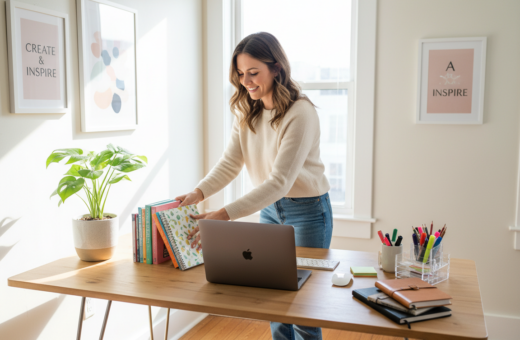
Michael Helwig, a principal designer at Michael Helwig Interiors in Buffalo, New York, says that true organization cuts down on mental load. When a person reduces the number of times their environment pulls them away from a task, focus improves and the day feels simpler.
A cluttered home office creates real fatigue. Every pile of papers or cable tangle can register as an unfinished project in the brain. That constant background noise makes it harder to start and finish work.
By setting aside a little time each week to tidy the desk, people keep their office a functional space rather than a stress source. Defining a clear way to manage things stops repeated decisions about where items belong.
Good systems serve a goal: support the work you do at home without chasing a Pinterest look. When every item has a purpose, the week runs smoother and focus returns faster.
The Impact of Small Workspace Organization Habits
Clutter in a room raises cognitive load and chips away at daily focus. That extra mental work makes tasks feel harder and slows progress.
“A messy office makes it difficult for both employees and managers to focus on their daily tasks.”
Clearer areas cut stress and boost morale. Simple changes in a home office or shared office areas reduce distractions and help people make better choices fast.
- Cluttered workspace raises stress and saps motivation.
- Organizing shared areas is one effective way to improve team morale.
- Easy tips for a home office turn a chaotic room into a calm space.
- When managers keep their areas tidy, staff follow and stress drops.
Takeaway: Small, consistent actions reduce mental friction, lower stress, and help people produce higher-quality work.
Optimizing Your Desk Surface for Daily Productivity
A deliberate desk layout turns friction into forward momentum during the workday. Start by confirming your desk has at least a 20-inch depth so a monitor or laptop sits comfortably and the active work area stays clear.
Active Work Zone
The active spot sits directly in front of the user. It should hold the laptop or monitor and nothing that distracts from core tasks.
Daily Tools Zone
Place daily tools on the side of your dominant hand so each item is within reach. Pens, a notebook, and a phone charger belong here to avoid constant reaching.
Staged Items Zone
Put staged items at the far edge of the desk. These act as a visual reminder of your next goal without stealing attention from current work.
- Keep only what is used every day to maximize usable surface.
- Use a simple storage system under or beside the desk to prevent the desk from becoming a permanent storage area.
- A clear desk surface supports focus and better productivity all through the day.
Managing Paper Flow and Filing Systems
Paper piles slow decisions and steal minutes from every workday. A simple, repeatable approach keeps the desk clear and frees mental space for actual tasks. The method below fits a home office and larger office setups alike.
The Weekly Ten Minute Tidy
Reserve ten minutes each week to clear your trays and file papers. This tiny block of time makes the filing system sustainable and prevents documents from drifting into the wrong spot.
“Employees spend two and a half hours daily looking for information in disorganized files.”
Three-tray system: inbox, action-required, and files. Keep current project items in the action tray and move completed documents into files.
- Use a drawer cabinet under the desk for secure storage of important files.
- Label trays and folders so each item has a clear place.
- Clear trays each week to start the week with a tidy desk and ready tools.
Consistent filing saves time over the day and reduces the minutes spent searching for documents. When every paper has a designated home, the office runs more smoothly and people can focus on real work.
Taming Cable Clutter for a Clean Aesthetic
Tangled cords around a desk create a low-level distraction that interrupts focus during long work stretches. A few simple changes take less than an hour and keep the room looking finished.
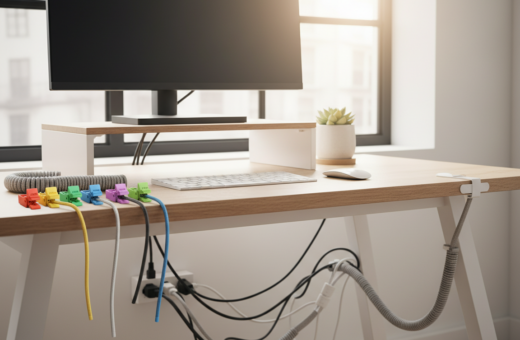
Start with a cable management box. These boxes cost about $15–$30 and hide power strips and messy tangles behind the desk. They give immediate visual calm and reduce the number of things that pull attention away from work.
Route cables to the box using clips or raceways. This setup takes roughly 20 minutes to install and keeps cords out of view. Label each cord near the plug with masking tape so the right cable is easy to find.
A wireless charging pad, priced around $20–$30, removes the most-handled cable from the desk surface. At the end of the day, one place to set a phone means fewer cords to manage and fewer minutes wasted unplugging devices.
“Fix the cable situation once and it stops being a daily distraction.”
- Visible cable tangles break focus during the work day.
- Routing and labeling create a reliable system with minimal time investment.
- A cable box and wireless pad are affordable options that keep the office tidy.
Strategic Storage Solutions for Limited Space
Maximizing vertical storage instantly expands the usable floor for key work items.
Installing two or three floating shelves above the desk moves books and binders off the surface and into the wall space.
When books and extra supplies live on shelves, the desk stays free for the project at hand. This also keeps papers and files from piling on the work area.
Monitor Riser Utility
A monitor riser elevates the screen and creates hidden storage underneath for pens, sticky notes, and chargers.
Use drawer dividers so small items have a dedicated place. A tidy drawer makes tools easy to find and prevents clutter from returning to the desk.
- Floating shelves turn vertical wall space into practical storage options.
- A monitor riser gives a prime spot for daily supplies and clears the desk surface.
- Drawer dividers keep small items organized so every tool has a place.
- Smart storage systems reduce visible papers and files, improving the look of a home office.
Ergonomic Considerations for Long Work Sessions
Long hours at a desk demand a setup that protects the body as much as it supports the work.
A proper ergonomic chair is a vital tool for your home office. It prevents the discomfort that accumulates during long work sessions and keeps attention on the tasks at hand.
Michael Helwig notes that a solid used office chair in the $100–$200 range often outperforms a new $200 chair from a home goods store. By the end of the day, a chair without good support can turn minor aches into a full-day distraction.
- Look for adjustable seat height and reliable lumbar support to match your desk posture.
- If you work more than two or three hours a day in a home office, invest in ergonomic furniture as a necessity, not a luxury.
- Proper ergonomics let the body stay comfortable so focus remains on work and tasks, not on pain.
“A chair that supports the body keeps the mind free to do the job.”
Lighting Techniques to Reduce Eye Strain
A few thoughtful lighting tweaks transform a dim room into a productive, comfortable space. Good light helps sustain focus through the work day and keeps fatigue at bay.
Task Lamp Positioning
An adjustable task lamp, priced around $50–$80, should sit on the user’s non-dominant side. This placement removes shadows on documents and prevents glare on screens.
If someone reads physical documents for hours, an angled lamp with dimming control gives focused illumination without washing out the page.
Bias Lighting Benefits
Bias lighting is an LED strip mounted behind the monitor or on the wall behind the screen. It takes about ten minutes to install and costs $15–$25.
By lowering contrast between the bright display and a darker room, bias lighting reduces end-of-day headaches. The result is a calmer space that supports long screen sessions.
- Proper task lamp positioning lights the workspace without creating screen glare.
- Natural light should come from the side, not directly behind the monitor.
- Quick bias lighting setup improves comfort in the home office and helps with focus on tasks.
Takeaway: Spending a few minutes on lighting setup is one of the easiest ways to protect the eyes and keep the room comfortable throughout the day.
Finishing Touches That Enhance Your Work Environment
Finishing touches convert a purely practical room into a space that invites focus. A few intentional choices make the area more pleasant without adding clutter.
Place a single plant on the desk or a nearby wall shelf to bring life into the room. Greenery calms the view and is an easy way to refresh the home office.
Choose art that genuinely appeals to you. When someone looks up from the screen, meaningful art can restore energy and boost productivity.
A consistent scent anchor, such as a candle or diffuser, helps signal the start of work. This sensory cue makes it easier to shift into a focused way of working.
- Foundation first: good storage and clear supplies systems keep the area usable.
- Select a few display items that inspire rather than distract.
- Use art and greenery to make the space feel personal and finished.
For more ideas on creating a functional and inviting home office organization ideas, review practical tips that balance storage and style.
Conclusion
A short, repeatable system at week’s end reduces stress and makes each day easier. It helps the home office and the wider workspace stay ready for work. When a plan exists, weekly upkeep becomes a clear goal rather than an open task.
Spend a little time each Friday to sort papers, reset the desk, and check storage so every item has a place. That regular checkpoint protects room and space, saves minutes during the next day, and keeps basic tasks from piling up.
Over time, these tips boost productivity and lower stress. A steady, maintainable approach to organization becomes a habit that supports focus and a smoother work day in the home office.